

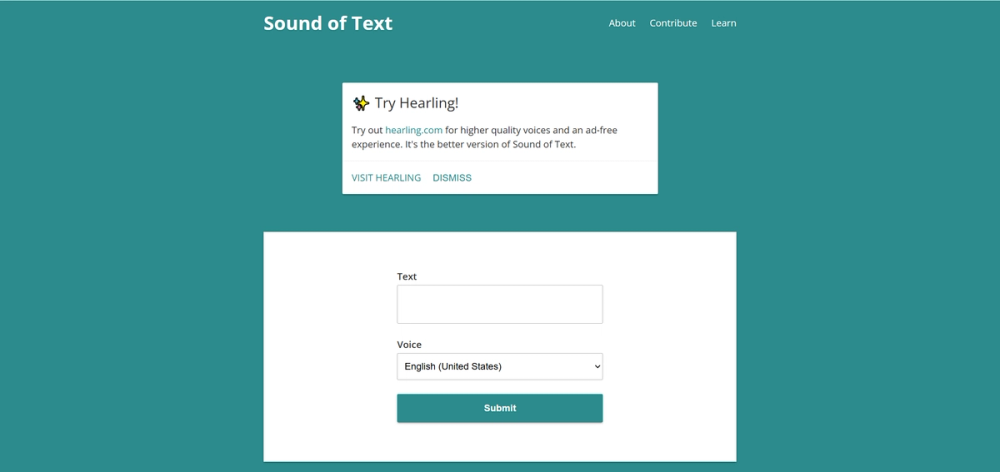
[SoundofText]: The No-Nonsense Way to Download Google’s Voice
SoundofText is a delightfully simple website that lets you type text, generate audio using the Google Translate engine, and—crucially—download it as an MP3. The headline feature is its friction-free access: there is zero cost and no sign-up required, though you are limited to short snippets (approx. 200 characters) per download.
🔊 What It Actually Does
- MP3 Extraction: Most TTS tools lock audio behind a paywall or complex menus. This tool gives you a direct "Download" button for the audio file immediately after generation.
- Google Engine Wrapper: It uses the standard Google Translate voices we all know. This means you get access to 30+ languages and accents (like standard Spanish vs. Mexican Spanish) without needing a Google Cloud API key.
- Flashcard Ready: Since it creates individual files for short phrases, it is the perfect companion for language learners building Anki decks or digital flashcards.
The Real Cost (Free vs. Paid)
The tool is completely free but comes with a "snack-sized" limitation. It is built for words and sentences, not paragraphs.
| Plan | Cost | Key Limits/Perks |
|---|---|---|
| Free | $0 | ~200 characters per clip. No daily limit, but you must manually process each phrase one by one. |
| Pro | N/A | There is no paid tier on the site itself. (The developer suggests "Hearling" for advanced features). |
How It Stacks Up
- VS. TTSMP3.com: If you need to read a whole paragraph, go to TTSMP3.com. It is also free but allows significantly longer text inputs than SoundofText.
- VS. Speechify: Speechify is the "Ferrari" with ultra-realistic AI voices and a high price tag. SoundofText is the reliable bicycle—robotic and basic, but it gets you there for free.
- VS. Google Translate: You can listen to audio on Google Translate, but you can't easily download the file. SoundofText solves exactly that problem.
The Verdict
SoundofText is a digital antique in the best possible way. In an era where every new tool demands a subscription, a login, and your first-born child, this site just does one thing perfectly. It is not for creating audiobooks or professional voiceovers. It is for the language learner who needs to hear "Schadenfreude" fifty times, or the video editor who needs a quick, robotic "ERROR" sound effect. Sometimes, you don't need AI magic; you just need a button that works.


