

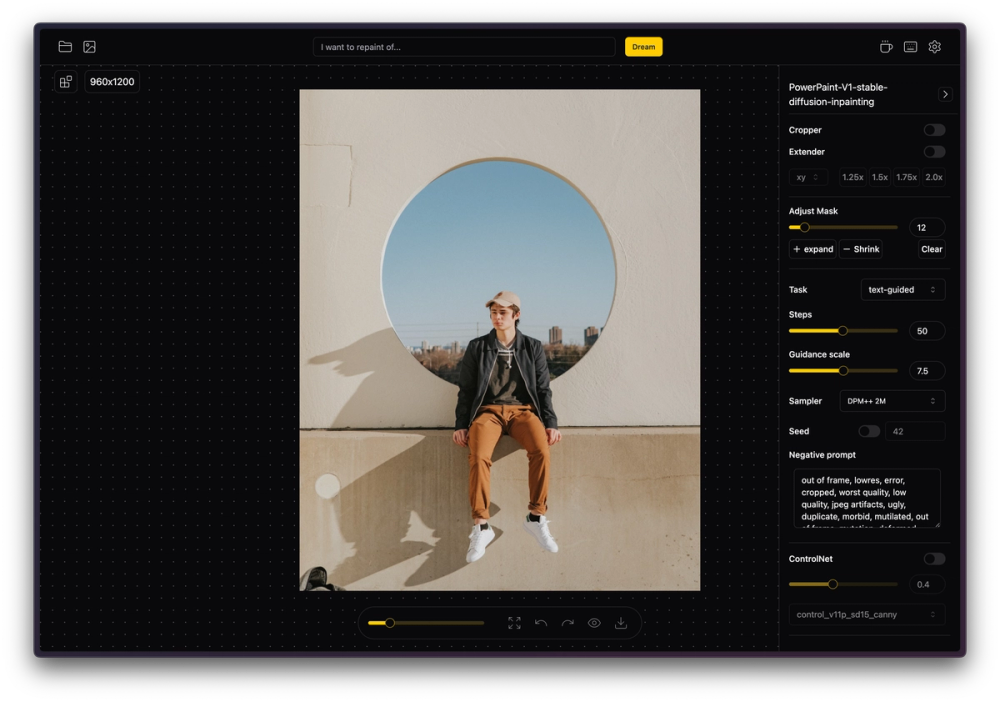
IOPaint: The Totally Free Object Remover (With One Tiny Catch)
Most "free" AI tools are like drug dealers: the first hit is free, but the moment you want high-resolution results, they demand your credit card. IOPaint is the rare exception that breaks this rule entirely.
Here is the bottom line: IOPaint removes unwanted objects, text, or defects from your photos with zero limits, zero costs, and zero watermarks. The catch? It’s not a website you just visit; it’s a piece of software you run on your own computer (or via Google Colab). If you're willing to click a "Download" button instead of a "Sign Up" button, you just found the best deal in tech.
🎨 What It Actually Does
IOPaint (formerly Lama Cleaner) is an open-source engine that uses advanced AI models to erase parts of an image and intelligently fill in the background.
- Eraser Mode: [Removes objects/people] – Perfect for getting rid of photobombers or that ugly trash can in your vacation pic without Photoshop skills.
- Inpainting: [Add/Replace objects] – Instead of just removing, you can type "red hat" to replace a removed object with something new using Stable Diffusion.
- Super Resolution: [Upscaling] – It can fix blurry details or upscale small images, saving you from "pixelated mess" syndrome.
- Text Removal: [AI Text detection] – Automatically finds and wipes text from images, which is a godsend for cleaning up memes or stock photos.
The Real Cost (Free vs. Paid)
There is no "Pro" plan for IOPaint because it is Free and Open Source Software (FOSS). You are the host. Your computer is the server.
| Plan | Cost | Key Limits/Perks |
|---|---|---|
| IOPaint (Local) | $0 | Unlimited edits, 4K+ resolution, No watermarks. Runs on your PC/Mac. |
| Competitors | ~$5-10/mo | Usually capped at 720p for free; charge for high-res downloads. |
| OptiClean | ~$10 | The developer's paid macOS/iOS app wrapper if you want the "lazy" version. |
Note: Because it runs locally, the "speed limit" is your own computer's graphics card. If you have an old laptop, it might take a few seconds longer per edit.
How It Stacks Up (Competitor Analysis)
Most users default to easy web tools, but they pay for it in quality. Here is how IOPaint compares to the big names:
- Vs. Cleanup.pictures: Cleanup.pictures is the industry standard for ease of use—just open the site and go. However, the free version locks you to 720p resolution. IOPaint has no resolution limits; you can clean up a 20MB DSLR photo without paying a dime.
- Vs. Google Magic Editor: Google's tools are fantastic but are often locked behind a Pixel phone or a Google One subscription. IOPaint works on any Windows, Mac, or Linux machine, freeing you from the Google ecosystem.
- Vs. Adobe Firefly: Adobe is the king of quality but requires a Creative Cloud subscription or expensive credit packs. IOPaint uses similar "Stable Diffusion" tech to give you comparable results for free, provided you can handle a slightly less polished interface.
The Verdict
IOPaint represents a dying breed in the AI gold rush: tools that empower the user rather than rent-seeking from them. It reminds us that "Practical AI" doesn't have to mean "Subscription AI." By shifting the processing power from a cloud server to your local machine, IOPaint offers true creative freedom. It asks a little more of you upfront—a download and an install—but in exchange, it gives you the keys to the castle. For anyone who edits photos regularly and hates hitting "Upgrade to Pro" paywalls, this is an essential install.


